As an Amazon Associate I earn from qualifying purchases.

The complimentary, open source PhoneBox control panel puts old Android screens back to work.
My cooking area scrap drawer utilized to hold takeout menus and vouchers, however it has actually given that ended up being a storage area for old tablets or phones. Like me, you most likely have a couple of gadgets lying around that are completely practical however do not satisfy your day-to-day driving requirements. It’s tucked out of view, living out its life in a drawer till being eliminated and contributed after somebody asks why you’re keeping out-of-date, unused gadgets. The good news is, PhoneBox has an option. You weren’t hoarding old tech; you were waiting on the appropriate usage.
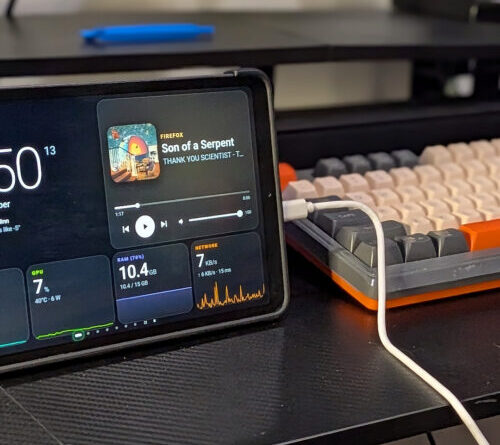
The PhoneBox home screen shows beneficial statistics and what’s presently playing in your web browser.
Credit: Nick Indge
The PhoneBox home screen shows beneficial statistics and what’s presently playing in your web browser.
Credit: Nick Indge
I had an old AllDoCube iPlay 50 mini Pro 8.4-inch tablet that appeared like the ideal prospect. I purchased the tablet pre-owned as a possible big-screen video gaming and emulation tablet to utilize with a telescopic control deck, however I rapidly discovered I significantly chose simply utilizing a devoted gadget. Because that awareness, this good little system has actually lived its life in “the drawer.”
Introduce applications on your PC from the linked Android gadget.
Credit: Nick Indge
Introduce applications on your PC from the linked Android gadget.
Credit: Nick Indge
Setup is a doddle
Getting PhoneBox up and running on my tablet and PC could not have actually been easier. After making certain that the Android tablet remained in designer mode, the procedure was as simple as plugging the tablet in to my PC by means of USB and performing a single copied command in my Linux terminal. The script downloaded the PhoneBox 0.9.29 software application for my PC, validated the downloaded checksum versus the release, and strolled me through a couple of fast Y/N setup concerns. The script uses to produce a systemd user service, so the desktop representative launches after preliminary login, and even asks if you ‘d like it to set up the PhoneBox APK to your linked Android gadget.
Designer choices and ADB are needed for USB setup.
Credit: Nick Indge
Designer alternatives and ADB are needed for USB setup.
Credit: Nick Indge
I currently had actually designer mode initialized on the tablet however needed to go back and enable ADB over USB in settings. The overall setup time from copying the script from the task site to whatever working on my PC and tablet 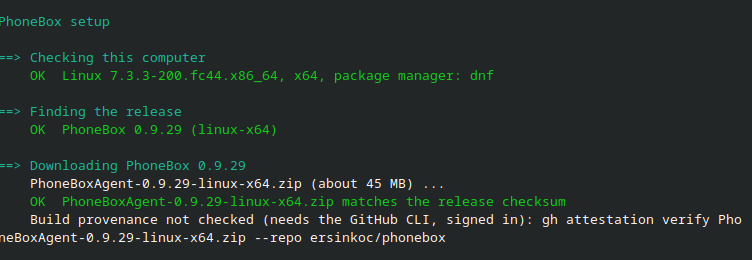 was less than a minute. The app is MIT-licensed, deals with Android 5.0 or later on, and needs sideloading, given that it is not readily available on the Google Play Store.
Credit: Nick Indge
Credit: Nick Indge
The setup script likewise prints its own uninstall script
The script can set up the APK straight to your gadget.
Credit: Nick Indge
The script can set up the APK straight to your gadget.
Credit: Nick Indge
What your gadget ends up being
The very first time you fire up PhoneBox, you get live efficiency and diagnostic details from your PC, together with a number of pages of optional material that can be fine-tuned for your regional setup to show details that’s relevant to your usages.
Wish to look at your system resources in-game?
Credit: Nick Indge
Wish to examine your system resources in-game?
Credit: Nick Indge
Where PhoneBox actually begins to shine is the widget brochure– a collection of totally free add-ons that can be included as pages to the tablet’s biking page designs. There are more basic widgets, such as RSS feeds that screen news highlights from your picked sources, or basic screens like timers or world clocks.
No scarcity of readily available add-ons.
Credit: Nick Indge
No scarcity of readily available add-ons.
Credit: Nick Indge
I chose a couple of various widgets that captured my eye.
Home Assistant linked gadget controls on PhoneBox.
Credit: Nick Indge
Home Assistant linked gadget controls on PhoneBox.
Credit: Nick Indge
Establishing extra widgets is as easy as including them to the page design from the PC’s web user interface and striking conserve. As quickly as I upgraded things from the PC, the linked tablet instantly started showing the modifications. I have not had the opportunity to check the majority of the 131 existing alternatives in the widget brochure, however the ones I did attempt were easy to customize and dealt with the very first shot.
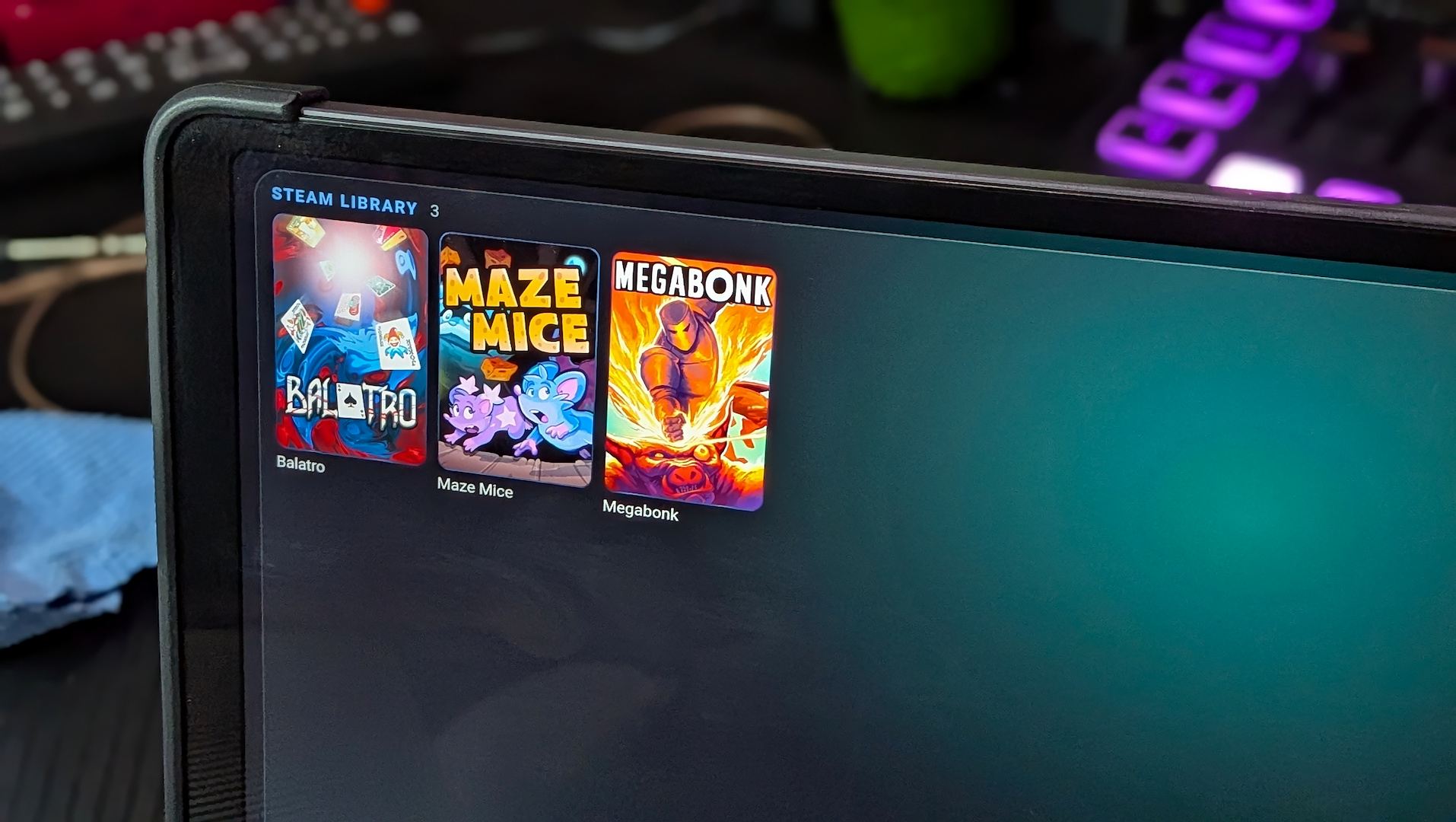
I can release set up Steam Library titles from the tablet controls.
Credit: Nick Indge
I can release set up Steam Library titles from the tablet controls.
Credit: Nick Indge
Some frictions
While I didn’t have any significant problems with PhoneBox, I did discover a number of early inconveniences along the method. Windows users ought to know that the PC buddy app on that OS is presently anonymous, and they need to anticipate a SmartScreen alert when trying to set up the software application.
All control settings reside in the web user interface instead of the phone or tablet you’re linking. When I initially began tinkering PhoneBox, I observed it showed my weather condition place as Tallinn. Absolutely nothing versus the capital of Estonia, however that’s not weather info that does me much excellent here in the United States Midwest. When I entered into the widget settings to alter the report place, there was absolutely nothing to be discovered. It ends up that you need to alter those settings from the basic user choices area instead of within the widget itself. Not a deal-breaker by any ways, however a small misstep for somebody who was brand-new to the software application.
Linking the Android tablet with my PC over USB was absolutely pain-free, however I never ever got the cordless path to operate in my screening. Users are implied to create a QR code from the PhoneBox web user interface on their PC and link it to their gadget by scanning the code with their phone/tablet. Each time I attempted to scan the code from my gadget’s cam app, the tablet declined. There’s no QR scanner constructed into the PhoneBox app, so if your electronic camera app will not work together, the recorded course dead-ends. USB was my designated path anyhow and works excellent, however if you’re preparing a wireless-only setup, be gotten ready for possible friction. The recorded circulation requires your gadget cam to open the pairing link, and mine wasn’t in the state of mind.
I might need to go back and attempt the cordless mode once again.
I might need to go back and attempt the cordless mode once again.
These small gripes need to be smoothed over before the release of 1.0. The task is early, however it appears to be moving rapidly. I evaluated and set up PhoneBox variation 0.9.29, which was among numerous releases pressed to the task’s GitHub in as lots of days. One product of history worth keeping in mind: On November 20, the job released a high-severity security advisory covering variations 0.9.23 and earlier. The vulnerability possibly permitted another app working on the linked Android gadget to perform commands or get saved qualifications from the host PC. The defect no longer existed by the time I checked the bundle in variation 0.9.29, however it’s a great tip that you’re setting up something with deep system gain access to and must work out proper care.
Is it worth attempting?
As long as you’re part of the group that has an old phone or tablet lying around someplace, and nowadays I anticipate that the majority of us are, then it’s an emphatic yes. Repurposing old gadgets to discover brand-new lives is among the important things that keeps me a tech enthusiast. I enjoy discovering really beneficial and useful applications for gadgets that have actually been brushed aside by their producers in favor of the most recent and biggest in the lineup.
Screen all your system processes live.
Credit: Nick Indge
Screen all your system processes live.
Credit: Nick Indge
PhoneBox took a tablet that was forgotten in a scrap drawer and predestined for contribution and provided it a brand-new lease on life. I have not invested a single cent, however I now have a helpful secondary display screen on my desk. The tablet is powered through a devoted USB port on my PC, and just goes to sleep when my primary screen display screens do. Go dig through those secret drawers in your home, since this one is beneficial.
Nick Indge is a Senior Technology Reporter at Ars Technica covering hardware, ingrained systems, and self-hosted facilities. A previous security detective turned tech author, he composes to assist readers get away membership traps and gain back ownership of their digital lives. He resides in Chicagoland with his household and a goofball husky.
46 Comments

Learn more
As an Amazon Associate I earn from qualifying purchases.