As an Amazon Associate I earn from qualifying purchases.

buttons are back, type of
Kindles are getting more expensive faster than they’re improving.
Credit: Andrew Cunningham
Credit: Andrew Cunningham
Supply pressures, scarcities, and inflation have actually pressed tech rates non-stop up over the last half-decade, and even fundamental devices have not been immune. That’s why you can invest$385 on a Raspberry Pi, or why the least expensive Amazon Kindle in 2026 expenses more than the midrange one from a couple of years earlier.”New thing, much better functions, exact same rate “utilized to be a trustworthy formula, now you’re fortunate if you can get the very same thing for hardly more than in the past.
The 2024 Kindles all included little rate boosts, however the 2026 designs make them appear like excellent offers. The$ 160 Kindle Paperwhite from 2 years ago wipes the flooring with this year’s$150 Kindle in almost every possible method, from screen size to front light quality to waterproofing– something to think about if you’re picking in between an utilized or reconditioned Paperwhite and among these brand-new designs.
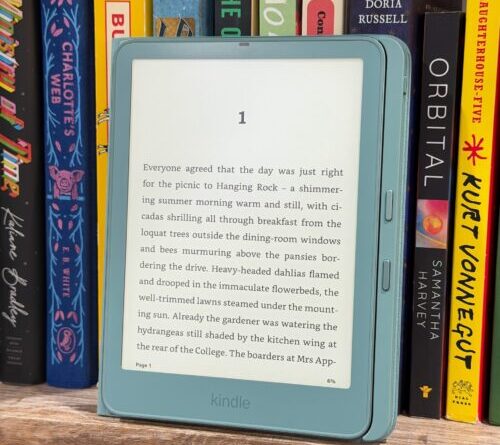
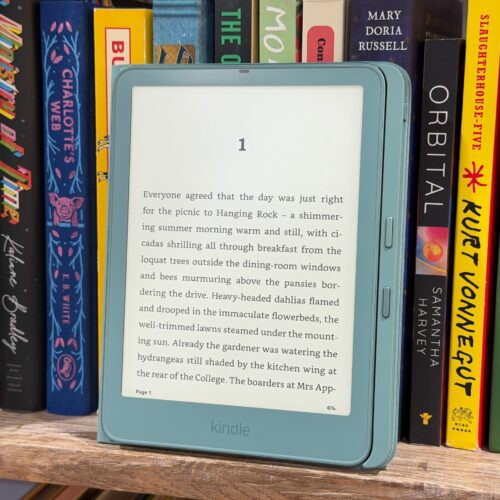
The flagship of the now five-model-large black and white Kindle household is the$250 2026 Paperwhite Signature Edition, which takes the core specifications of the brand-new $200 Paperwhite and puts it in a strong iPad-esque aluminum case rather of the normal plastic.
It’s an extremely great reader, and if you’re down with paying evenmore for it, long time page-turn button holdouts can recuperate their valuable buttons while still getting the advantages of brand-new, quick Kindle hardware. With the exception of one regression– cordless charging, a function of the 2024 Signature Edition that has actually been gotten rid of here– it’s the fastest and best Kindle you can get. It’s mainly the worth, or absence thereof, that leaves a bad taste in one’s mouth.
Hardware updates
Unlike the 2021 or 2024 Kindle Paperwhite updates, the 2026 Paperwhite does not consist of any significant screen or lighting upgrades. Anybody updating from a 2- or three-generation-old variation of the hardware will still get an upgrade, however the 2026 Paperwhite isn’t doing a heap to press the classification forward. And while speed boosts were front-and-center in Amazon’s advertising product for the 2024 Paperwhite, Amazon isn’t highlighting any specific gains for this year’s Paperwhite (the base Kindle does obviously open books 30 percent quicker than the previous-generation Kindle, though).
The Paperwhite and this year’s fundamental Kindle both make a couple of tweaks worth discussing that do not truly reveal up on a spec sheet. One is that the gadget’s power button relocations from the bottom edge to the top-right edge, a little modification I value due to the fact that I’ve unintentionally pushed the bottom-mounted power button all the times I’ve attempted to set the Kindle on the edge of something. The other is that the gadgets now have user-replaceable batteries, a modification made in part to abide by right-to-repair guidelines entering into result in some nations.
Whether you’re purchasing the basic plastic-backed Paperwhite or the aluminum Signature Edition, you’re still getting a 7-inch 300 PPI screen with a front light that can change its color temperature level in addition to its brightness, which I discover makes the Paperwhite simpler on the eyes than the harsher, more bluish-tinted front light on older Kindles and the standard 2026 Kindle. The plastic Paperwhite is a smidge lighter than the 2024 variation, and the Signature Edition is a little much heavier (thanks in part to the aluminum case), though not by a lot in either instructions.
Whether it’s faster than the 2024 Paperwhite or not, the stylish and fluid efficiency I observed while utilizing that gadget is absolutely present in this one. The E-Ink screen still puts a cap on precisely how fluid and responsive the gadget can feel, however you seldom feel the huge space in between your touch input and the gadget reacting to that input like you can on a lot of older Kindles. (I attempted consistently to run the old Google Octane 2.0 standard I utilized to get a sense of the 2024 Paperwhite’s relative efficiency, however it might never ever finish a run in either the 2026 Kindle or the 2026 Paperwhite’s web browser, for whatever factor).
Notes on the standard Kindle
The 2026 Kindle( ideal )and the 2018-era Paperwhite. Very same size screen, much smaller sized gadget.
Andrew Cunningham
I didn’t invest as much time with it, however I did check the fundamental 6-inch Kindle together with the Paperwhite Signature Edition.
In general, I like the upgraded look of the upgraded Kindle, especially the reality that the screen and bezel are now flush, as the last couple of Paperwhites have actually been. And regardless of utilizing the very same 6-inch screen size as older Paperwhites, Amazon has considerably diminished the total size and weight of the gadget. It does not rather appear like a”Kindle mini”beside the present Paperwhite, however it’s not far off.
You’re still getting less for your cash than you were a couple of years earlier. If you compare the 2026 Kindle to the 2024 or 2022 design,andyou overlook what every one of those gadgets expense to purchase, it appears like sluggish and stable enhancement. The reality is that you can pay $150 for this Kindle andloseessential functions, like the warm light and waterproofing, that Amazon used in the 2021 Paperwhite for simply $140 back in 2021.
That’s simply the truth of purchasing innovation today. “Get more for the exact same cash” is out. Now if you desire more, you need to pay more.
Put a button on it
The brand-new Paperwhite Signature Edition’s most significant upgrade, need to you select to spend for it, is the addition of page-turn buttons. Page-turn buttons by proxy, a minimum of.
The Signature Edition includes iPad-style copper contacts on the back, and for another $80 (on top of the $250 you’ll spend for the Kindle) you can purchase a Kindle Page Turn Cover in different colors that links to those contacts with pogo pins. It’s the cover that includes the buttons. Amazon likewise provides a $60 charging stand that utilizes the pins, the closest equivalent for the now-removed cordless charging function.
The cover actually does make the brand-new Paperwhite feel and look a bit more like a Frankenstein Kindle Oasis, right to the unbalanced edge that the button location includes. And the page-turn buttons themselves feel excellent and work well. The physical feedback from clicky buttons and the Kindle’s total responsiveness both make page turns feel almost instant when you push it to turn a single page. Clicking the buttons rapidly to turn numerous pages still gets slowed down a little.
Functionally, the worst things I can state about the Page Turn Cover are that it contributes to the reader’s size and weight, and the power button does not feel almost as great as the page-turn buttons. The case’s “button” is essentially a little plastic nub that presses in the gadget’s real integrated power button. A minimum of with the hardware I purchased, the case’s button seems like it can’t regularly reach the gadget button, which suggests it wasn’t constantly reputable. This is partially moot due to the fact that opening and closing the cover likewise wakes and sleeps the gadget.
Amazon provides one more affordable choice for each other Kindle that can run the latest variation of the Kindle os: a $35 remote control-style Kindle Click. As a totally different device you need to hold or rest on something in order to utilize, I do not discover this to be an especially engaging service to the “no buttons” issue. It’s likewise the only variation of “clickable buttons” that Amazon provides for less than $330. It is what it is.
The Kindle Click needs a Kindle running variation 5.20.1.0.2 or later of the Kindle os. Presently, that variation just works on the 2024 and 2026 Kindles, plus 2022’s Kindle Scribe. It appears as though Amazon has actually gotten stingier with long-tail Kindle OS updates than it remained in 2024, when all Kindles returning to 2018 might run the very same software application. The 2018 Kindles presently peak at 5.18, while the other 2021/22 Kindles stop at 5.19.
Still great readers, however not excellent upgrades
The 2026 Kindle Paperwhite Signature Edition.
Credit: Andrew Cunningham
The 2026 Kindle Paperwhite Signature Edition.
Credit: Andrew Cunningham
The last reader Amazon provided with page-turn buttons was 2019’s$ 249 Kindle Oasis, which was dented basically throughout the board for being “pricey.” Today’s Kindle Paperwhite Signature Edition will cost you simply as much, however charge you $80 additional for the case and buttons. It’s a better reader in some crucial methods, most especially its USB-C port and much-improved efficiency. That’s still a quite considerable boost for anybody with an aging Oasis they ‘d like to change with a Paperwhite-plus-case.
That’s my reaction to the brand-new Paperwhite and to all of this year’s Kindle releases in a nutshell. Theyare good, however they’re a lot more costly than Kindles have actually remained in the extremely current past that it’s difficult to feel really passionate about them. The standard Kindle-versus-old-Paperwhite contrast is the one that’s the most discouraging– the Kindle has actually gotten Paperwhite-style rates faster than it has actually included Paperwhite functions.
Ideally we’ll see third-party device makers determine assistance for their own pogo-pinned devices, to bring the rates down simply a bit. Otherwise, if you do not require or desire buttons, the very best method to discover a bargain on a Kindle is most likely to purchase an old one– the 2024 Paperwhite is $130 today, and you may wish to get it while the getting’s excellent.
The great
- Quick, responsive e-reader that’s comfy to hold and to take a look at for long stretches.
- Warm light on the Paperwhite is a lot more enjoyable than the standard Kindle front light.
- Flush-front style and considerably smaller sized, lighter style for the standard Kindle.
- User-replaceable batteries.
- The return of page-turn buttons, sort of.
The bad
- Cost walkings.
- If you desire buttons, you’ll spend for them.
- No more Qi cordless charging on the Signature Edition.
- Still no waterproofing on the standard Kindle.
Andrew is a Senior Technology Reporter at Ars Technica, with a concentrate on customer tech consisting of hardware and extensive evaluations of running systems like Windows and macOS. Andrew resides in Philadelphia and co-hosts a weekly book podcast called Overdue.
132 Comments
Learn more
As an Amazon Associate I earn from qualifying purchases.